Context windows as UX
Prompt design is interface design. The context window is not a backend detail — it's the surface your users are touching whether they know it or not.
Her name was Dian. She was a mid-level account manager at a B2B SaaS company, and she was beta-testing the internal assistant we’d built to help reps pull deal context before calls. She’d been using it for about fifteen minutes. I was watching over her shoulder — ostensibly for “quality research,” actually because the product felt slow and I wanted to see why.
She typed: “Can you remind me what we talked about on the Telkomsel account? I think I gave you context earlier.”
The assistant replied with something confident and entirely wrong. It fabricated a summary of a deal that didn’t exist.
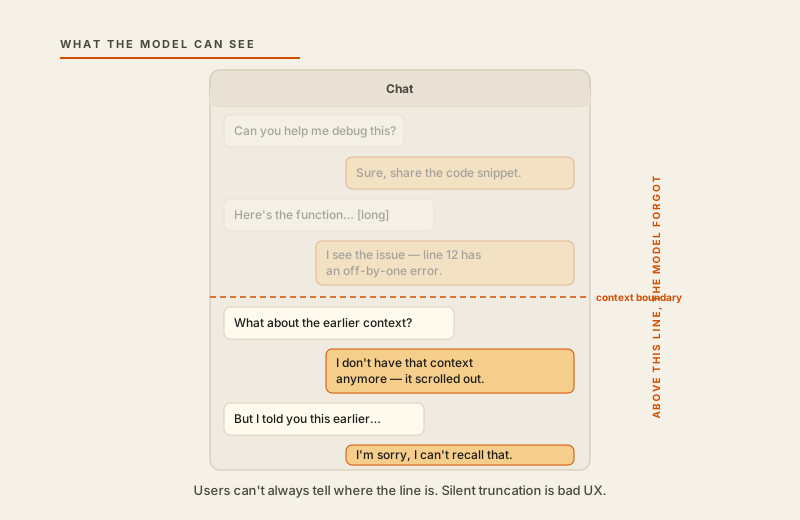
Dian frowned at the screen. She scrolled up. There it was — four exchanges ago, she had pasted in the full account history from the CRM. A wall of text. The model had read it, confirmed it, even pulled a specific detail back into one reply. Then, a few turns later, it was as if none of that had happened. The context had been silently pushed out of the window as new messages came in. The assistant hadn’t told her. There was no indicator, no warning, no graceful fallback. It just quietly forgot and kept going.
She closed the laptop. “It’s not consistent,” she said. “I can’t tell when it remembers and when it doesn’t.”
I wrote that down. But I was still thinking about it as a model behavior problem, not a product problem. I didn’t see what was actually happening yet.
The gap I was standing in
What Dian experienced was a context truncation. In engineering terms, this is mundane: the model has a fixed context window, the conversation grew past it, older tokens were dropped to stay within the limit. Standard behavior. We had tuned the window size to balance cost and latency. We knew about it. We’d logged it. Nobody had told Dian.
Here is the gap I was standing in and couldn’t see: to me, the context window was a backend parameter. A number in a config file. I was thinking about it in terms of tokens and API costs and how it interacted with retrieval. To Dian, it was whether the assistant remembered her. Whether she could trust it. Whether the thing she’d spent fifteen minutes teaching was still listening.
Those are the same fact. Same underlying event, two different frames. And I had built the product entirely from my frame.
The product team had designed the chat interface — the input box, the message bubbles, the timestamps, the “thinking” spinner. We’d thought about onboarding, about error states for network failures, about empty states. We had not thought once about what it looked like — to the user — when the model’s memory silently reset. We had treated the context window as infrastructure. Dian was treating it as the interface.
She was right.
Three things that are UX, not backend
Affordances. An affordance is a signal that tells a user what they can do. A button affords clicking. A text field affords typing. A conversation affords speaking. But the context window creates an invisible affordance problem: users assume the assistant can “see” everything they’ve said. When it can’t, they don’t know. There’s no affordance for the limit.
Simon Willison has written repeatedly about the gap between how developers think about LLM products and how users actually experience them. One of his consistent observations is that silent failures — especially in context and memory — erode trust faster than any other failure mode. The user doesn’t see a crash. They just see a model that seems to know things sometimes and not others, and they conclude the product is unreliable. Which is a fair conclusion. It is unreliable, in the ways that matter to them.
The fix for affordances is visibility. If earlier messages are no longer in the active context, say so. This doesn’t need to be technical. “Some earlier messages may no longer be visible to the assistant” is a complete sentence that a user can act on. Show a faint indicator in the chat when the window is approaching its limit. Let users know what the model can see right now, not just what they have sent.
Feedback. Nielsen’s 10 usability heuristics — written in 1994 and still mostly correct — include “visibility of system status” and “help users recognize, diagnose, and recover from errors.” Those aren’t AI-specific. But they become urgent in AI products because the feedback mechanisms we normally rely on are stripped away. There’s no 404. There’s no spinner that spins forever. There’s just a confident paragraph that may or may not be grounded in anything the user actually said.
When the model doesn’t know, it should say so in user-facing language. “I don’t have access to the account context you shared earlier — could you paste it in again?” is a real interface message. It is helpful, honest, and actionable. “I’d be happy to help with the Telkomsel account” — when the model has already forgotten the Telkomsel account — is none of those things.
The feedback loop isn’t just about errors. It’s about building a working relationship between the user and the system. Ethan Mollick has documented how much variation there is in how people actually use LLMs — most users are still building their mental model of what these systems can and can’t do. The product’s job is to help them build an accurate one.
Mental models. This is the one that took me longest to see. Users build an intuition for what the model remembers based on what it confirms. If the assistant echoes back something the user told it — “Right, you mentioned the Telkomsel contract is up for renewal in Q3” — the user learns: it heard me. If the assistant never confirms, never reflects, never acknowledges what it has been told, the user’s mental model stays inaccurate. They’ll either over-trust or under-trust. Both are product failures.
Designing for mental model formation means being deliberate about confirmation. When a user gives the assistant context, have it acknowledge that context explicitly. When the assistant draws on something the user said three exchanges ago, name that: “Based on the account history you shared earlier…” This isn’t padding. It’s the model teaching the user how to work with it. You’re building the mental model on purpose, rather than letting the user build a wrong one by accident.
The engineer’s blind spot
We think of the context window as a number. 128k tokens. 200k. 1M. We talk about it in the context of capability — “you can fit an entire codebase in context” — or in the context of cost — “long contexts are expensive to run.” Both framings treat it as an internal concern.
Anthropic’s guidance on prompting long-context models addresses the structural challenge of what to put where in a large context, and how models attend to information at different positions. That’s useful engineering knowledge. But it’s still written for the engineer. It doesn’t help you answer the question Dian was implicitly asking: what does this feel like from the user’s side of the screen?
From the user’s side, the context window is the model’s working memory. It’s the mental workspace of the assistant they’re talking to. When it’s full and overflows, the assistant has amnesia — but it doesn’t act like it has amnesia. It just answers as if nothing happened. That mismatch between the user’s expectation (“you remember everything I told you”) and the system’s actual behavior (“I silently dropped your earlier messages”) is an interface gap. It belongs in the product roadmap, not just in the engineering runbook.
Moves that compound
A few concrete things I’ve seen make a difference:
Make truncation visible. Not with an error. With a quiet indicator in the conversation thread — something like a light horizontal rule with “Earlier messages may not be visible to the assistant.” Low drama. High honesty.
Label the model’s uncertainty in user-facing language. If your product has access to a confidence signal, surface it where the user can see it. If it doesn’t, design the prompt to produce explicit hedges: “Based on what you’ve shared in this conversation…” bounds the model’s claims to what it actually has access to.
Design the prompt like you’d design a form. A well-designed form has labels, sections, clear instructions about what goes where. A well-designed system prompt does the same work. When I rebuilt the assistant after Dian’s session, I restructured the system prompt into explicit labeled sections — one for product context, one for user context, one for task instructions — with clear delimiters. The model’s behavior became more consistent. The user’s ability to predict that behavior improved. Those are connected.
When you shorten context to save cost, tell users you did it. Not a wall of fine print. One line, surfaced at the right moment. “To keep responses fast, this assistant summarizes older parts of the conversation.” Users can handle that. What they can’t handle is silent behavior change that makes the assistant seem untrustworthy.
I still think about Dian closing that laptop.
She didn’t know what a context window was. She shouldn’t have needed to. What she knew was that the assistant she’d been talking to for fifteen minutes had, partway through, stopped listening. Not dramatically. Just quietly. Confidently, unhelpfully, invisibly.
She called it “inconsistent.” That was a generous word. It was an interface failure — specifically, the interface had no way to tell her what was happening. The context window is not a backend parameter. It is the boundary of the model’s attention, and it is always, already, a user-facing surface.
Build it like one.